
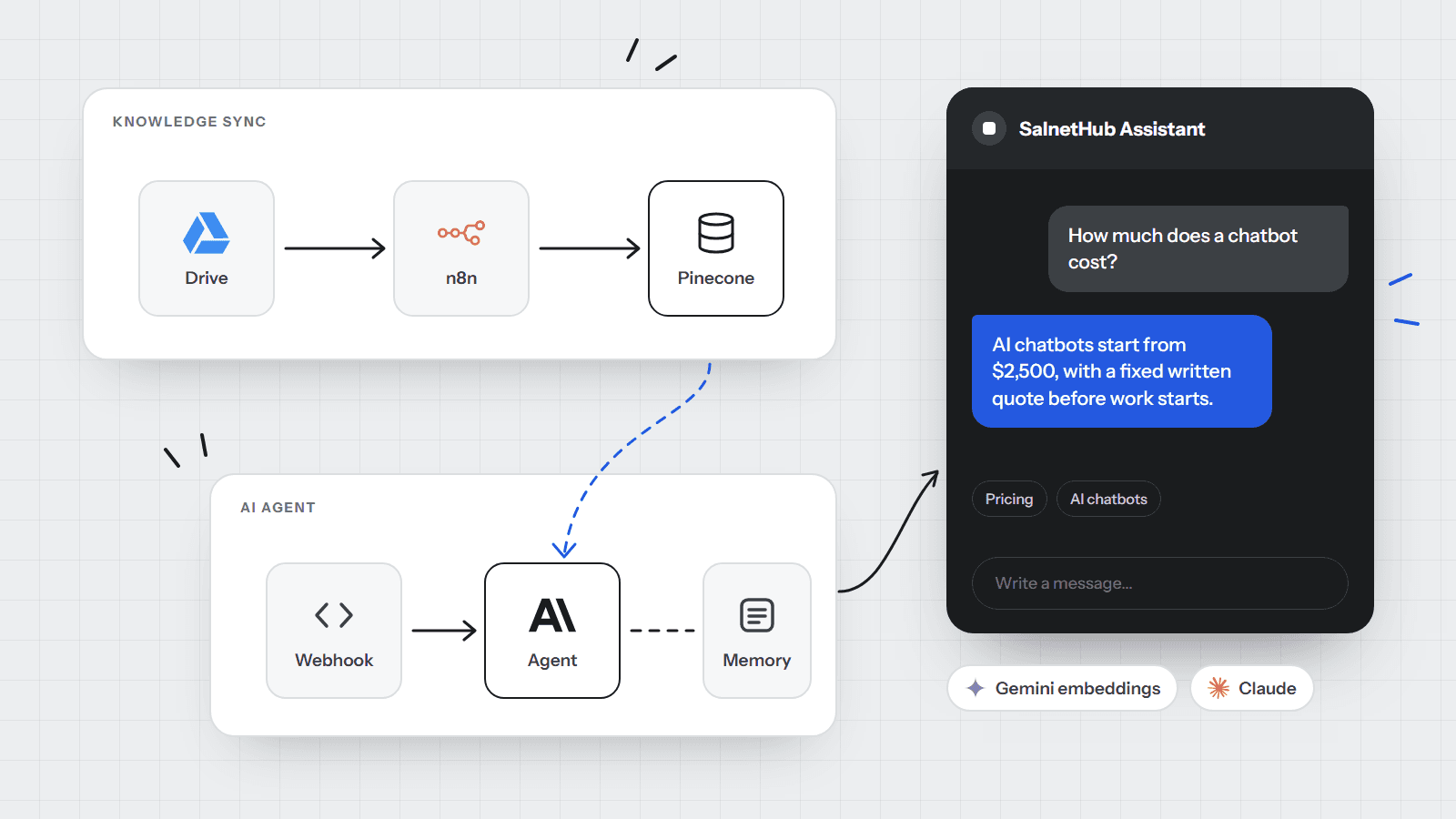
The chat in the corner of this site answers questions about SalnetHub from a knowledge base we built out of our own website. Ask it what a chatbot costs and it says "from $2,500, with a fixed written quote", because that is what our pricing page says, not because a model guessed.
This post is the build, end to end: what we used, how the two halves fit together, and the four problems we hit before it worked well.
The stack
We kept to tools a small team can run and change without a developer on call:
- Google Drive holds the knowledge base. Anyone on the team can update it by dropping in a new file.
- n8n (self-hosted) runs two workflows: one keeps the knowledge base in sync, the other answers questions.
- Pinecone stores the searchable version of the knowledge base, on the free plan.
- Gemini (
gemini-embedding-001) turns text into vectors, the numbers Pinecone searches by. - Claude writes the replies.
- The website (Next.js on Vercel) sends each question to n8n through a small server route.
Step 1: a knowledge base built from the site itself
The model was going to be the easy part. The content was not. Rather than write a new FAQ document, we wrote a script that reads the same content files the website is built from: every service, starting price, care plan, FAQ, process step, integration and policy. It produces one JSON file and one PDF.
Two decisions mattered here:
- We left out anything that is not true yet. Sample case studies and placeholder testimonials were excluded on purpose, so the bot cannot quote a client we do not have.
- One source of truth. When a price changes on the site, we rerun the script and upload the new PDF. The bot and the website can never disagree for long.
Step 2: the sync workflow
The first n8n workflow checks the Drive folder every minute and starts when a file is added or updated. It clears the Pinecone namespace, then reads every file in the folder, splits the text into overlapping chunks of about 2,000 characters, embeds each chunk with Gemini and stores it in Pinecone.
Clearing and reloading everything sounds wasteful, but at this size it is quick, and it removes a whole class of bugs: no duplicate chunks, and no stale passages left behind from an older version of a file. The JSON copy lives in a Source subfolder the workflow skips, so the same content is not loaded twice.
Step 3: the answer workflow
The second workflow starts from a webhook. The website posts the visitor's message, a session ID and the page they are on. n8n checks the input, then hands it to an AI agent with three things attached:
- A knowledge tool that searches Pinecone and returns the 6 most relevant passages.
- Memory of the last 8 messages in that visitor's conversation, so "and how long does that take?" makes sense.
- Instructions: answer only from the knowledge base, never invent prices or clients, point interested visitors to a free call, and stay on topic.
If anything in the agent fails, the workflow still replies with a polite fallback and the booking link, and emails us an alert.
The model was never the hard part. Deciding what it is allowed to know was.
Step 4: connecting the website
The chat widget does not call n8n directly. It calls a route on our own site, /api/chat, which adds a secret header and forwards the question. The secret never reaches the visitor's browser, so nobody can copy it and run up our AI bill from their own script.
The route also gives n8n 25 seconds to answer. If n8n is down or slow, the widget shows a short built-in answer with buttons to book a call or contact us. A visitor is never left staring at a spinner.
What went wrong, and how we fixed it
The vector sizes did not match
Pinecone asks for a "dimension" when you create an index, and it cannot be changed later. We first created ours at 1,536, the size OpenAI's small embedding model uses. Then we switched to Gemini, whose model produces 3,072 numbers per chunk. Every insert failed until we deleted the empty index and created it again at 3,072. Pick the embedding model first, then create the index to match.
The test URL is not the live URL
n8n gives every webhook a test URL and a production URL. The test URL only works while someone is watching the workflow in the editor. The website must use the production one, and the workflow must be published.
The answers were too long
The first version answered "How much does a chatbot cost?" with 109 words, three bullet points and two links. Accurate, but nobody wants a brochure in a chat bubble. We rewrote the instructions to answer in the first sentence, keep to one to three sentences, use plain text and include at most one link, and we lowered the reply limit from 400 to 200 tokens.
Shorter replies also came back faster: the price question went from 12.3 to 8.6 seconds.
Self-hosting has a cost
Our n8n runs on our own machine behind a tunnel. That is fine for our site, and the fallback answer covers the gaps, but a client's chatbot should run on a small cloud server so it is never off when a laptop sleeps.
What it does today
The chat answers questions about our services, prices, process and policies in a few sentences, remembers the conversation, and suggests a call when someone is ready to buy. Every conversation is visible in n8n's execution log, which has already shown us which questions people ask most, and that tells us what to add to the website next.
Playbook
- Build the knowledge base from your real content, and leave out anything that is not true yet.
- Choose the embedding model before you create the index, and match its dimension exactly.
- Rebuild the whole index on every change while it is small; it is simpler than tracking what changed.
- Keep secrets on your server, never in the browser.
- Write length and tone rules first. A correct answer that is too long still reads as a bad answer.
- Always have a fallback that gives the visitor a next step when the AI is unavailable.
Want one of these trained on your own documents? See our RAG systems service, or book a free 30-minute call and ask the chatbot's builders directly.
Written by
Bwire Solomon
Founder, SalnetHub
Solomon has built automations, CRM workflows and AI agents for 53 client projects since 2023, mostly for small teams running on Google Workspace, HubSpot, Zoho, Make, Zapier and n8n.